- All
- Product Name
- Product Keyword
- Product Model
- Product Summary
- Product Description
- Multi Field Search
Language


Views: 222 Author: Ella Publish Time: 2025-04-23 Origin: Site


Content Menu
● What Is Regeneration and Why Is It Needed?
● Understanding the Terex Concrete Mixer Truck Emissions System
● Step-by-Step Guide: How to Regen a Terex Concrete Mixer Truck
>> Preparation
>> Initiating Manual Regeneration
● Troubleshooting Common Regen Issues
● FAQ
>> 1. How often should I perform a manual regen on my Terex concrete mixer truck?
>> 2. What happens if I ignore the DPF warning light?
>> 3. Can I drive the truck during the regen process?
>> 4. What should I do if the regen process fails?
>> 5. How can I reduce the frequency of manual regens?
Regenerating a Terex concrete mixer truck is a critical maintenance task that ensures the longevity and optimal performance of your vehicle's emissions system. This comprehensive guide will walk you through the regeneration (regen) process, explain why it's necessary, and provide expert tips, visual aids, and video demonstrations to make the procedure straightforward and safe.
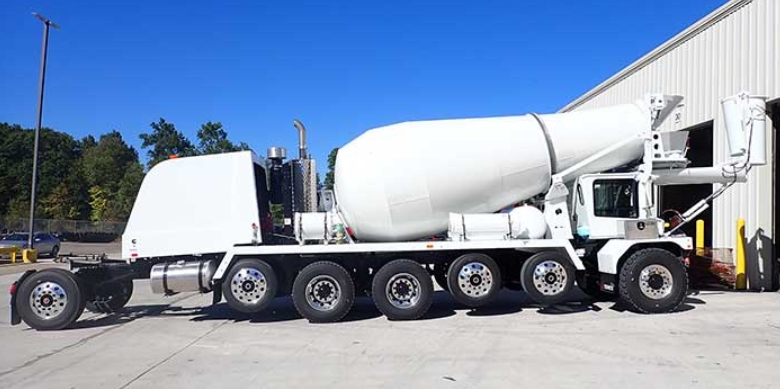
Concrete mixer trucks, especially modern models like those from Terex, are equipped with advanced emissions control systems. These systems, including Diesel Particulate Filters (DPF) and Selective Catalytic Reduction (SCR), require periodic regeneration to burn off accumulated soot and maintain compliance with environmental standards. Failing to perform regular regens can lead to reduced engine performance, increased fuel consumption, and costly repairs.
Regeneration is the process of burning off soot and particulates that accumulate in the DPF. As your Terex mixer truck operates, its engine produces soot, which is trapped by the DPF to prevent harmful emissions from entering the atmosphere. Over time, this soot builds up and, if not removed, can clog the filter and reduce engine efficiency.
There are two primary types of regeneration:
- Passive Regeneration: Occurs automatically during normal driving when exhaust temperatures are high enough.
- Active/Manual Regeneration: Initiated by the operator when the vehicle's system cannot clear the soot passively, typically indicated by a warning light on the dashboard[1][4][7].
Terex concrete mixer trucks utilize advanced aftertreatment systems, including:
- Diesel Particulate Filter (DPF): Captures soot and ash from the exhaust.
- Selective Catalytic Reduction (SCR): Uses Diesel Exhaust Fluid (DEF) to reduce nitrogen oxide emissions.
- Sensors and Control Modules: Monitor soot levels and trigger regeneration when necessary[5][6].
1. Ensure Safe Parking
- Park the truck on a level, non-flammable surface (avoid dry grass or leaves).
- Set the parking brake and ensure the transmission is in neutral[1][4][7].
2. Check Engine Conditions
- Engine coolant temperature should be between 180°F and 185°F for optimal regen.
- Turn off the fan override switch if equipped[1].
3. Monitor Warning Lights
- If the DPF warning light is illuminated, a regen is required.
- Do not attempt a manual regen unless prompted by the system[7].
4. Locate the Regen Switch
- Find the blue “Regen” or “DPF” switch on the dashboard (see image below).
5. Start the Regen Process
- Hold the regen switch for 5–6 seconds until the engine RPM increases (typically to 900–1100 RPM)[1][4][7].
- The high exhaust system temperature lamp may illuminate, indicating the process has started[4].
6. Wait for Completion
- The regen process takes 30–45 minutes.
- Do not operate the vehicle or touch any controls during this time.
- The DPF warning light will turn off once regen is complete[4][7].
7. Post-Regeneration Check
- Ensure all warning lights are off.
- If the light remains on, repeat the process once. If it still fails, seek professional service[4].
- How to do manual regen on your Oshkosh mixer
- Manual Regen Video Thumbnail
- Parked Regen Video Thumbnail
Adhere to Regular Maintenance Schedules
- Perform regular oil and filter changes, and follow the manufacturer's service intervals for the DPF and SCR systems[2].
Clean the Mixer Drum and Chassis
- Wash the truck thoroughly after each use to prevent concrete buildup and corrosion[2].
Monitor Tire and Hydraulic System Condition
- Regularly check tire pressure and hydraulic fluid levels to ensure safe operation[2].
Store Properly
- Park trucks in climate-controlled facilities when not in use to prevent moisture and temperature-related damage[2].
Inspect Wear Parts
- Replace worn-out paddles, liners, and wear plates promptly to avoid secondary damage[2].
- Ensure engine temperature is sufficient and all prerequisites are met (parking brake set, neutral gear, fan override off)[1][4].
- Check for any active fault codes or warning lights.
- Do not touch controls or move the truck during regen.
- If the process fails twice, contact a service center for diagnostics[4].
- Excessive idling or short trips can increase soot accumulation.
- Address any engine performance issues promptly.
Regeneration is an essential maintenance procedure for Terex concrete mixer trucks, ensuring that your emissions system remains efficient and compliant with environmental regulations. By following the step-by-step guide, utilizing visual aids, and adhering to regular maintenance, you can keep your truck running smoothly and avoid costly downtime. Always consult your operator's manual and seek professional assistance if you encounter persistent issues.

Manual regen should only be performed when indicated by the DPF warning light or when the system prompts you. Under normal conditions, passive regeneration during regular driving is sufficient. Frequent manual regens may indicate underlying issues that require attention[1][7].
Ignoring the DPF warning can lead to filter clogging, reduced engine performance, increased fuel consumption, and potential engine damage. Eventually, the truck may enter limp mode, requiring immediate service[4][7].
No. During a manual or parked regen, the truck must remain stationary with the parking brake engaged and transmission in neutral. Driving during regen can interrupt the process and may damage the emissions system[1][4][7].
If the regen fails, repeat the process once. If it fails again, do not continue operating the truck. Seek professional service to diagnose and resolve the issue[4].
Minimize excessive idling, ensure the engine reaches optimal operating temperature during use, and perform regular maintenance. Address any engine or aftertreatment system issues promptly to maintain efficient passive regeneration[2].
[1] https://www.youtube.com/watch?v=pOJfpMsnJe4
[2] https://www.simplyfleet.app/blog/concrete-mixer-truck-maintenance
[3] https://www.terex.com/advance/en/products/overview
[4] https://www.youtube.com/watch?v=yeW9l_pLFuE
[5] https://www.terex.com/docs/librariesprovider20/parts-manuals/2016-front-discharge-mixer-truck-parts-manual-pn_30947_fdpb_rev_6.pdf
[6] https://cdn.mpparts.com/pdfs/Terex%20Front%20Discharge%20Operator%20Manual.pdf
[7] https://www.youtube.com/watch?v=8NxT2Tl71ME
[8] https://cdn.mpparts.com/pdfs/Terex%20Front%20Discharge%20Operator%20Manual.pdf
[9] https://www.terex.com/docs/librariesprovider20/parts-manuals/2016-front-discharge-mixer-truck-parts-manual-pn_30947_fdpb_rev_6.pdf
[10] https://www.terex.com/advance/en/products/overview
[11] https://www.terex.com/advance/en/support/service
[12] https://www.terex.com/docs/librariesprovider20/parts-manuals/2010-front-discharge-mixer-truck-parts-manual-pn_30947_fdpb_rev_5.pdf
[13] https://www.terex.com/advance/en/about/news-and-events/service
[14] https://www.manualslib.com/manual/2041310/Terex-T300-1.html?page=170
[15] https://www.terex.com/advance/en/support/training
[16] https://www.yumpu.com/en/document/view/52215037/terex-front-discharge-operator-manual-mixerandplantpartscom
[17] https://www.equipmentworld.com/regulations/equipment/article/14948471/rebuilt-machinery
[18] https://www.terex.com/utilities/en/utility-pros/base-your-preventative-maintenance-schedule-on-actual-work-conditions
[19] https://www.youtube.com/watch?v=1qCpcp--iUg
[20] https://www.terex.com/advance/en/home
[21] https://www.youtube.com/watch?v=gJm1MCnernM
[22] https://www.pinterest.com/pin/769130442581943854/
[23] https://www.youtube.com/watch?v=lKU_3xTMEZ4
[24] https://www.pinterest.com/pin/advance-terex-mixer-truck-heavy-duty-vehicle--231091024599603294/
[25] https://www.youtube.com/channel/UC17-Jd5qeT3xQWOvjOLlNKw
[26] https://www.activeradiator.com/terex-radiators/
[27] https://www.youtube.com/watch?v=sP_myLUBhwU
[28] https://www.youtube.com/watch?v=05irnr7XWAU
[29] https://proallinc.com/news/routine-maintenance-for-volumetric-mixers/
[30] https://www.terex.com/utilities/en/support/technical-support/tech-tips
[31] https://www.reddit.com/r/Truckers/comments/qkomzh/truck_wont_do_a_parked_regen/
[32] https://www.forconstructionpros.com/concrete/equipment-products/concrete-mixers/article/22878808/cummins-inc-hydrogen-concrete-mixer-project-started
[33] https://www.terex.com/docs/librariesprovider20/parts-manuals/2019-commander-series-parts-manual-pn_37355_fdpb_rev_1.pdf
[34] https://www.terex.com/advance/en/product/commander-series/fdb7000
[35] https://www.forconstructionpros.com/concrete/equipment-products/concrete-mixers/video/20989668/video-terex-designs-frontdischarge-mixer-truck-to-win-reardischarge-buyers
